How to Update Banking Details on Neds Account Online

Want expert predictions delivered daily?
Get free tips on Telegram or upgrade to Premium.
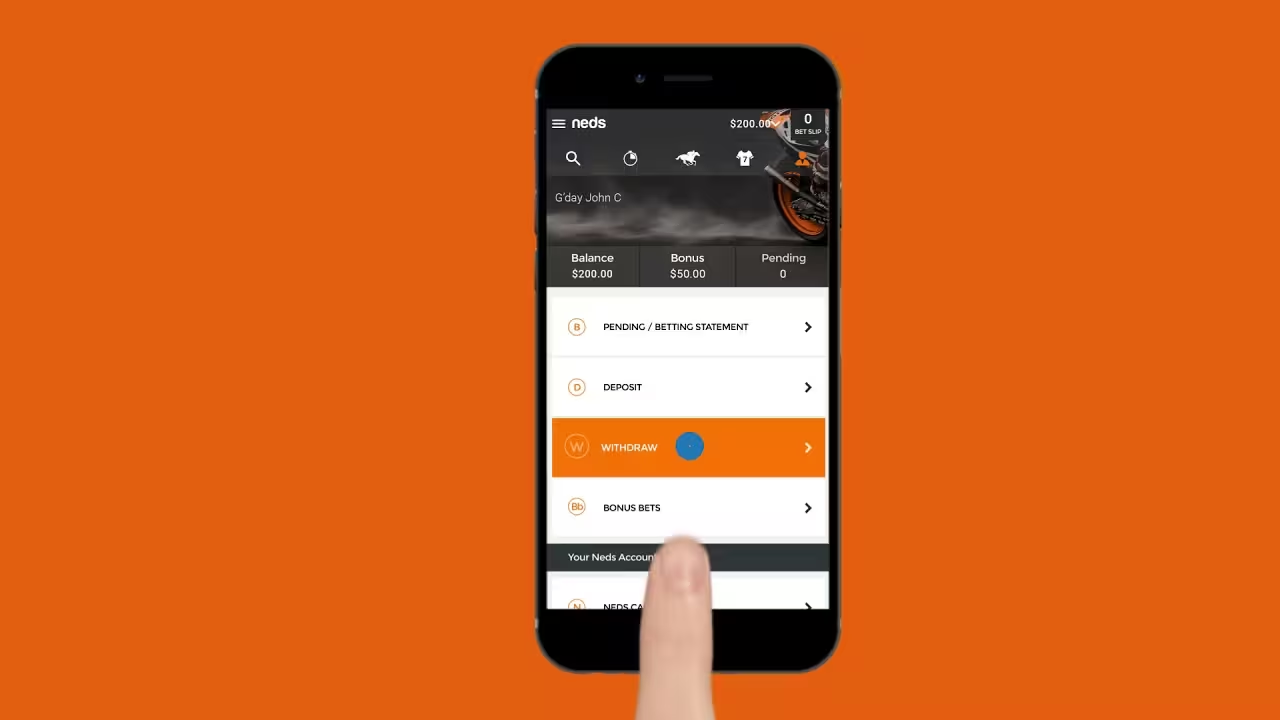
Updating your banking details on your Neds account online is a straightforward process that can be completed through their website or mobile app. You can change or add new deposit methods like credit/debit cards and update your nominated bank account for withdrawals directly within your account settings.
This article will guide you through each step, explaining why you might need to make these changes and how to do so securely. By the end, you will understand how to manage your financial information on Neds, ensuring your betting experience remains smooth and your funds are always accessible.
Why You Might Need to Update Your Neds Banking Information
There are several practical reasons why you might need to update your banking details on your Neds account. Keeping your financial information current is important for uninterrupted betting and withdrawal processes.
Perhaps your credit or debit card has expired, or you have switched to a new bank account. You might also want to add a different payment method for convenience or to take advantage of specific features. Whatever the reason, Neds makes it simple to keep your details up-to-date.
Updating Your Deposit Methods on Neds
Managing your deposit methods on Neds involves adding new cards or other payment options, and sometimes removing old ones. This process ensures you always have a valid way to fund your betting account when you need to place a bet.
Follow these steps to add or manage the ways you put money into your Neds account, whether it's a new card or another method. It's a quick process designed to keep your betting seamless.
Adding a New Credit or Debit Card
If you have a new credit or debit card, or simply wish to add another one, Neds allows you to do this easily. Make sure you have your card details handy before you begin this process.
Here’s how to add a new card to your Neds account:
- Log in to Your Neds Account: Go to the Neds website or open the Neds app and enter your username and password.
- Access the Deposit Section: Look for the 'Deposit' button, usually found at the top right of the page or within your account menu.
- Select 'Add New Card': On the deposit page, you'll see options for different payment methods. Choose the option to add a new credit or debit card.
- Enter Card Details: Carefully input your new card number, the expiry date, and the CVV (the three-digit security code on the back of your card).
- Save Your Card: Review the details to ensure they are correct, then click 'Save' or 'Add Card'. Your new card should now be available for deposits.
Removing an Existing Deposit Method
Sometimes you might want to remove an old or unused deposit method from your Neds account. This helps keep your payment options tidy and secure.
Here are the steps to remove a deposit method:
- Log in to Your Neds Account: Access your account as usual through the Neds website or app.
- Navigate to Account Settings: Find your account menu, often labeled with your name or an icon, and look for 'My Account' or 'Settings'.
- Find Payment Methods: Within your account settings, there should be a section dedicated to 'Payment Methods' or 'Banking'.
- Select and Remove: Locate the card or deposit method you wish to remove. There will usually be an option, like a 'Delete' or 'Remove' button, next to it. Confirm your choice if prompted.
Changing Your Withdrawal Bank Account Details
Your nominated bank account is where Neds sends your winnings when you request a withdrawal. It is important to keep these details accurate to ensure your funds reach you without delay.
If you've changed banks or want your winnings sent to a different account, you will need to update this information. Neds takes security seriously, so there might be a verification step when changing withdrawal details.
Here’s how to update your withdrawal bank account:
- Log in to Your Neds Account: Start by logging into your Neds account online or via the app.
- Go to 'My Account' or 'Settings': Access your personal account area, which usually contains options for managing your profile and banking.
- Find the Withdrawal or Banking Section: Look for a section specifically for 'Withdrawals' or 'Banking Details'.
- Update Bank Account Information: You will typically see your current nominated bank account details. There should be an option to 'Edit' or 'Add New Bank Account'.
- Enter New Details: Carefully input the new BSB (Bank State Branch) and Account Number for your desired bank account. Double-check these numbers to avoid errors.
- Confirm and Save: Follow any on-screen prompts to confirm the change. Neds may require you to re-enter your password or complete a security verification step to protect your account.
Common Banking Questions and Troubleshooting on Neds
Even with clear instructions, you might encounter questions or minor issues when managing your banking details. Understanding common scenarios can help you resolve them quickly.
Here are some frequent banking questions and tips for troubleshooting on your Neds account. If you need general betting advice, consider reading our Understanding Sports Betting: A Beginner's Guide.
Why Can't I Withdraw to My Credit Card?
In Australia, due to responsible gambling regulations, you generally cannot withdraw winnings directly back to a credit card. Most Australian sportsbooks, including Neds, require withdrawals to be processed to a verified bank account.
This policy is in place to prevent issues related to credit card debt and to promote safer betting practices. Always ensure your nominated bank account for withdrawals is correct and up-to-date.
What If My Deposit Is Rejected?
If your deposit is rejected, there are a few common reasons. The card details might have been entered incorrectly, the card may have expired, or there might be insufficient funds.
Sometimes, your bank might decline the transaction due to their own security policies. It's best to double-check your card details, ensure funds are available, and if the issue persists, contact your bank or Neds customer support.
Do I Need to Verify My Account for Banking Changes?
Yes, Neds, like all regulated Australian betting sites, requires account verification for security and compliance reasons. Before you can make withdrawals, your account must be fully verified.
This usually involves providing identification documents. While you can often deposit before full verification, updating withdrawal details or making your first withdrawal will likely trigger a verification check if you haven't completed it already. For Neds-specific actions, you might also find our guide on How to Place a Multi Bet on Neds Australia useful.
Understanding Neds Payment Methods: A Quick Overview
Neds offers a variety of payment methods for both deposits and withdrawals, catering to Australian users. Knowing the typical processing times and options can help you manage your funds effectively.
This table provides a general overview of common payment methods available on Neds, including their typical processing times and key characteristics. Please note that specific limits and times can vary.
| Payment Method | Type | Typical Deposit Time | Typical Withdrawal Time | Key Characteristics |
|---|---|---|---|---|
| Credit/Debit Card (Visa/Mastercard) | Deposit | Instant | N/A (Withdrawal to bank account) | Widely accepted, instant funding. |
| Bank Transfer (POLi) | Deposit | Instant | N/A | Direct from bank account, no card needed. |
| PayPal | Deposit & Withdrawal | Instant | 1-3 business days | Secure e-wallet, convenient for both. |
| Neds Card | Deposit & Withdrawal | Instant | Instant (to Neds Card) | Prepaid card linked to Neds account, instant access to winnings. |
| Bank Transfer (Direct) | Withdrawal | N/A | 1-3 business days | Standard method for withdrawing winnings to your bank. |
Responsible Betting and Managing Your Funds
Managing your banking details on Neds is also an important part of responsible betting. It ensures you have control over your spending and can access your funds responsibly.
Always set deposit limits and only bet with money you can afford to lose. If you ever feel your betting is becoming a problem, Neds provides tools and resources to help, such as self-exclusion options and links to support services. Remember, betting should always be an enjoyable pastime, not a financial burden.
Updating your banking details on Neds online is a simple and secure process that ensures your financial transactions run smoothly. By following the steps outlined, you can easily manage your deposit methods and withdrawal accounts. Always double-check your details and remember to gamble responsibly.
? Frequently Asked Questions
How do I add a new credit card to my Neds account? ⌄
Can I withdraw my winnings directly to my credit card on Neds? ⌄
What should I do if my bank account details for withdrawal are incorrect? ⌄
How long does it take for Neds to process a bank transfer withdrawal? ⌄
Is it safe to update my banking details on Neds online? ⌄
Do I need to verify my account before I can change my banking details? ⌄
Related Articles
- How to Reset Bet365 Password via Email Confirmation
- Over/Under Betting Explained for Beginners
- Accumulator Betting Explained for Beginners
- How to check minimum deposit limits on dabble app
- How to Cancel a Pending Withdrawal on Bet365
- How to Withdraw Money from Sky Bet: A Complete Guide
- How to Check Your Betfair Betting History
📬 Free Daily Predictions
Get expert picks delivered to your inbox every morning.